What This Page Covers
This page walks through the mechanics of ordering, receiving, and — if needed — refunding a Moon Reading purchase, based on what the official checkout page itself displays. It's different from our buying checklist, which is about deciding whether you're ready to buy in the first place. If you haven't gone through that decision yet, start there; come back here once you're ready to see exactly what the checkout process looks like.
Everything described below reflects what was observed on the official checkout page and in the product's own sales materials at the time this guide was written. Checkout pages get updated by vendors — for the current, authoritative version of price, guarantee terms, and page contents, always check the live checkout yourself.
Step by Step
The Checkout Process
Click through to the official checkout
You start on moonreading.com's checkout flow, not on this guide site. Our guide to finding the official website covers how to make sure you're on the legitimate page rather than an unofficial copy — worth a quick read if you've never been there before.
Enter your customer information and choose a payment method
The checkout form asks for an email address (used to send your order confirmation) and lets you choose between PayPal or a credit card for payment. If you pay by card, the form separately requests card number, expiration date, security code, cardholder name, country, and zip code. Accepted cards observed on the page include Visa, Mastercard, American Express, and Discover.
Review the cart summary — and the optional upsell
Before you pay, the page shows a cart summary listing the "Ultimate Astrology Reading" as a digital product, along with a subtotal, tax, and total. Just below that, the checkout has displayed a "Recommended for You" section offering an optional one-click add-on called "Expanded Destiny Moon Reading" for $19 — described as an expanded version of the reading exploring lunar astrology in more depth. This upsell is optional; you're not required to add it to complete your base purchase. Read the cart summary carefully before paying so you know exactly what you're buying.
Complete payment
Payment is completed via a "Pay Now" button on the checkout page. The page displays trust badges — DigiCert, BBB Accredited Business, and TrustedSite — alongside the payment button, along with a link to the vendor's "Terms of Sale." Reviewing that terms link before paying is a reasonable step if you want the vendor's own full terms rather than relying on any third-party summary, including this one.
What the Checkout Looks Like
A Look at the Official Checkout Page
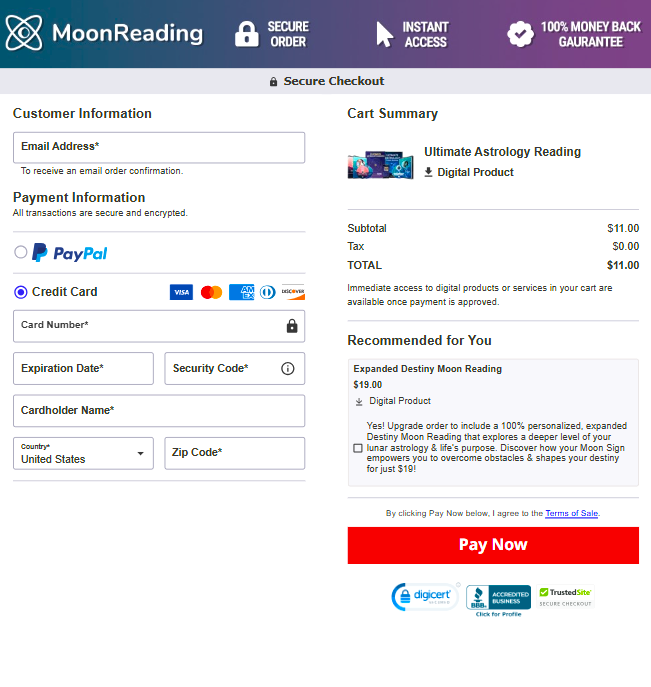
This is a screenshot of the official Moon Reading checkout page — not a page hosted by this guide site. We're showing it so you know what to expect before you click through, not because we process any part of this checkout ourselves.
Layout, badges, pricing, and upsell details shown here reflect what was captured at the time this guide was written and can change. Always treat the live checkout page as the current, authoritative version.
What the Trust Badges Generally Indicate
The three badges shown near the "Pay Now" button are common third-party trust indicators used across many e-commerce checkouts, not unique to this product. In general terms: a DigiCert badge relates to SSL/TLS certificate authority services, which support encrypted connections between your browser and the checkout server. A "BBB Accredited Business" badge relates to Better Business Bureau accreditation, a US-based business-reliability program. A TrustedSite badge relates to a third-party site-verification service that scans for common security issues. These badges indicate the checkout uses recognized third-party services of these types — we haven't independently audited the vendor's specific certification status with each provider, so if that matters to you, click through on the badges at checkout to see their current verification details.
After You Pay
What Happens Immediately After Purchase
Instant Digital Access
The checkout page's own "Instant Access" badge and cart-summary note both describe digital products as available once payment is approved. In practice, that generally means you're taken to an access or download page immediately after your payment is processed, without a shipping wait — because nothing physical is being sent. For more on what that access actually looks like day to day, see our guide to accessing Moon Reading online.
A Confirmation Email
You should also receive an order confirmation email at the address you entered at checkout. Based on standard practice for this kind of digital-product checkout, that email is also where you'll typically find the vendor's own support contact details — the address to use if you have a billing, access, or refund question later. Keep that email; it's your primary point of contact with the actual seller. If it doesn't arrive within a few minutes, check your spam or promotions folder before assuming something went wrong — confirmation emails from digital-product checkouts are commonly filtered there, especially on a first purchase from a new sender.
How the 60-Day Refund Process Works
According to the product's own sales materials, Moon Reading is sold with a 60-day money-back guarantee, described by the vendor in no-questions-asked terms. Based on that vendor framing, the general process is straightforward:
- You contact the vendor directly — using the support email address included in your order confirmation, not a form on this guide site.
- You request a refund within the stated guarantee window — the vendor's materials describe this as 60 days from purchase, but confirm the exact current terms shown at your checkout, since guarantee terms can be updated.
- The vendor processes the refund — timing and any conditions are set and handled entirely by the vendor's own support process, not by this site.
Important: get-moonreading.com is an independent guide, not the seller. We don't process payments, don't have access to your order or account, and cannot issue a refund on your behalf — even though we've linked you to the official checkout through an affiliate link. If something goes wrong with your order, the vendor's support contact from your confirmation email is the correct place to go, not this site. If you haven't purchased yet and want to weigh the guarantee alongside everything else before deciding, our buying checklist covers that decision in more depth.
Making Sure You're on the Legitimate Checkout Page
Because Moon Reading is sold through an affiliate-driven digital storefront, it's reasonable to want to confirm you're paying the real vendor rather than an unofficial copy or a phishing page. At a minimum, check that the page is branded "MoonReading," shows the "Secure Order," "Instant Access," and "100% Money Back Guarantee" badges described above, and that you arrived there through a link from a source you trust rather than an unsolicited email or ad you weren't expecting.
We cover this verification process in much more depth — including how to spot the difference between the real site and lookalike pages — in our dedicated guide to finding the official Moon Reading website. If you have any doubt at all before entering payment details, read that guide first.
Questions
Ordering & Refunds FAQ
What information do I need to enter at checkout?
Based on the checkout page, you'll need an email address to receive your order confirmation, plus payment details for either PayPal or a credit card (Visa, Mastercard, American Express, or Discover). You'll enter your birth details for the report itself as part of that flow.
What is the $19 upsell offer at checkout?
The checkout page has shown an optional, one-click add-on called "Expanded Destiny Moon Reading" for $19, described as a deeper, expanded version of the core report. It's optional — you can decline it and still receive the base "Ultimate Astrology Reading" report. Confirm current upsell contents and pricing at checkout, since they can change.
How quickly do I get my report after paying?
The checkout page displays an "Instant Access" badge, and digital products are generally described as available once payment is approved. You should also receive a confirmation email with order details and vendor support contact information.
How does the refund process actually work?
According to the product's own sales materials, Moon Reading is covered by a 60-day money-back guarantee. To request a refund, you contact the vendor's support email, which is included in your order confirmation — this independent guide site does not process payments or refunds and cannot do this on your behalf.
How do I know I'm on the real checkout page and not a scam copy?
Check that the page is branded "MoonReading," shows the trust badges described on this page (DigiCert, BBB Accredited Business, TrustedSite), and that you reached it through a link from a source you trust rather than an unsolicited message. Our dedicated guide to finding the official website covers this verification process in more depth.
Can get-moonreading.com place my order or fix a billing issue for me?
No. We're an independent guide site, not the seller. We don't have access to your order, payment, or account, and any billing, delivery, or refund issue needs to go to the vendor's own support contact from your confirmation email.
Ready to Go Through Checkout?
You now know what the checkout form asks for, what the upsell offer looks like, and how the refund process works if you need it.
Explore Your Moon Reading Back to the Buying ChecklistAffiliate link to the official moonreading.com checkout. We may earn a commission.